Rob Run Radar Hack: Settings and When Radar Beats ESP
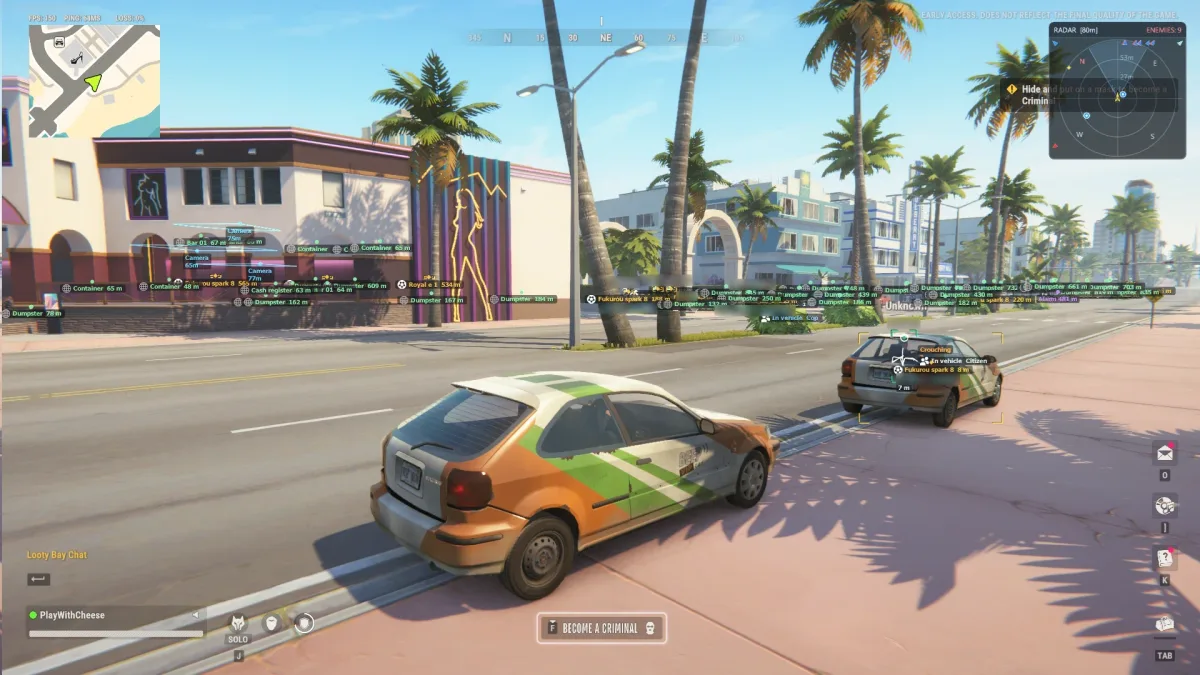
When people shop for Rob Run cheats, they usually ask about ESP and aimbot first. Radar gets less attention, but many experienced players end up relying on it more than anything else. A good Rob Run radar hack tells you where everyone is around you without putting a single box on your game view. This guide covers the radar settings in Elysium RR and explains when a Rob Run radar hack is the better tool.
What a Rob Run radar hack does
The radar is a small map overlay that shows nearby players, vehicles, loot, and cash as dots around your position. You get the layout of the area at a glance, including what is behind you and around corners.
Because it sits in one corner, it keeps the middle of your screen clear. That is the main reason people love it.
Size and range
Size sets how big the radar window is. Range sets how much of the world it covers.
These two work together. A small radar with a huge range packs every dot into a tiny space and nothing is readable. A big radar with a short range shows lots of detail but only for the area right next to you.
A good starting point:
- Medium size, large enough to read dots without squinting
- Range that covers the building you are in plus the streets around it
If you are a cop covering a wide area, increase the range. If you are clearing a store, shorten it so the dots spread out.
Rotate with camera
Rotate with camera turns the radar so that up always means the direction you are facing. With it off, the radar stays fixed to the map and you have to work out direction yourself.
Most users of Rob Run cheats find rotation easier during fights, because a dot at the top of the radar is always in front of you. If you prefer to think in map directions while planning a route, leave it off. Try both for a round each.
FOV cone
The FOV cone draws your field of view on the radar. It shows which dots are on your screen right now and which are outside it. This is useful for knowing when someone is beside or behind you, out of your sight but close.
Height
There is also a height option in the radar section. Remember that a flat radar cannot show floors on its own: a dot right next to you might be on the level above or below. Adjust the height setting while standing in a building with stairs, and pick the value that reads best for you before you rely on it in a fight.
Clamp out of range
Clamp out of range keeps players who are beyond the radar range pinned to the edge of the radar instead of vanishing. You do not see their exact distance, but you know which direction they are coming from. This is a good early warning for cops heading toward your robbery.
What to show
The radar can show players, vehicles, and loot and cash. Pick based on your role:
- Robber: players, vehicles, and loot and cash. You want to see value and threats at the same time.
- Cop: players and vehicles. Loot is less important than tracking who is moving where.
- Busy area: turn loot off for a moment if the radar gets crowded during a fight.
Background opacity
Background opacity controls how see-through the radar is. A more solid background makes the dots easier to read. A more transparent one lets you see the game behind it. Most players settle in the middle, enough contrast for the dots without blocking too much of the view.
When radar beats full Rob Run ESP
Full player ESP draws on top of the game. Radar does not. Here is when that matters.
Long sessions
Hours of boxes and text on screen are tiring. A radar gives you the same awareness with far less visual noise.
Fights in crowded places
In a packed store or near a buyer, ESP boxes overlap and become hard to read. The radar spreads everyone out in a top-down view, so you can count players and see their positions clearly.
Staying natural
With ESP, it is very tempting to track people through walls with your crosshair. That habit is what gets you noticed. Radar gives you awareness without pulling your aim, so your movement stays more natural. It is one of the easiest ways to make your Rob Run hacks look like good game sense.
Planning routes
For moving cargo or running between targets, the top-down view is simply better. You can see which streets are clear before you drive.
When ESP is still better
A radar hack does not tell you health, weapon, role, or KO status. In a close fight you want that information on the player directly. ESP is also better for reading exact positions in tight rooms where a few metres matter.
The best setup is usually both: a light player ESP for close range, and the radar for everything further out. Our Rob Run ESP guide shows how to keep player ESP light enough to work alongside the radar.
A combined setup to try
- Radar: medium size, medium range, rotate with camera on, FOV cone on, clamp out of range on
- Radar shows players and vehicles, plus loot and cash when robbing
- Background opacity around the middle
- Player ESP: corner box, name, health bar, role icon only
- Snaplines off, since the radar now handles direction
- Max ESP distance shorter than radar range
This keeps the middle of your screen nearly clean while still telling you where everyone is.
Pairing radar with the player list
The player list in the misc tab is another low noise way to keep track of who is in the session. It works well alongside the radar when you want to check who you are dealing with without staring at boxes.
Getting the radar
The radar is included in Elysium RR, next to the Rob Run aimbot and ESP, with all of the options above. Like the rest of the menu, the radar is StreamProof and stays out of your OBS or Discord feed. You can pick a plan on the Elysium RR page, and our installation guide explains setup from payment to the first launch.
Try a radar-first round
Next time you play, turn player ESP down to just names and health, and run the radar at medium size with rotation on. Play a whole round like that. Many players find they win just as much, feel less cluttered, and play in a way that looks much more like real awareness. If you are a cop, also read the cop guide for radar tips during chases.
Get Elysium RR for Rob Run
External, StreamProof, currently undetected. 7 Days $14.99 · 30 Days $29.99 · Lifetime $139.99
More Rob Run guides
Rob Run Anti-Cheat Update and HWID Bans: Who Gets Hit
If you use Rob Run cheats, you have probably seen the chatter this week: players saying they got hit with hardware bans after the latest anti-cheat changes. Some lost one account. Some say every account on the same PC...
Read article →
Rob Run ESP Guide: A Player ESP Setup You Can Read
Player ESP is the feature most people turn on first when they try Rob Run cheats, and it is also the one most people set up badly. Switch on every option and your screen turns into a wall of boxes, lines, and text that...
Read article →
Rob Run Aimbot Settings: Smoothing, FOV and Prediction
An aimbot is the part of Rob Run cheats that other players notice first. ESP happens on your screen. Aim happens in front of everyone. A badly tuned Rob Run aimbot can turn a quiet session into a pile of reports, while...
Read article →