Rob Run Aimbot Settings: Smoothing, FOV and Prediction
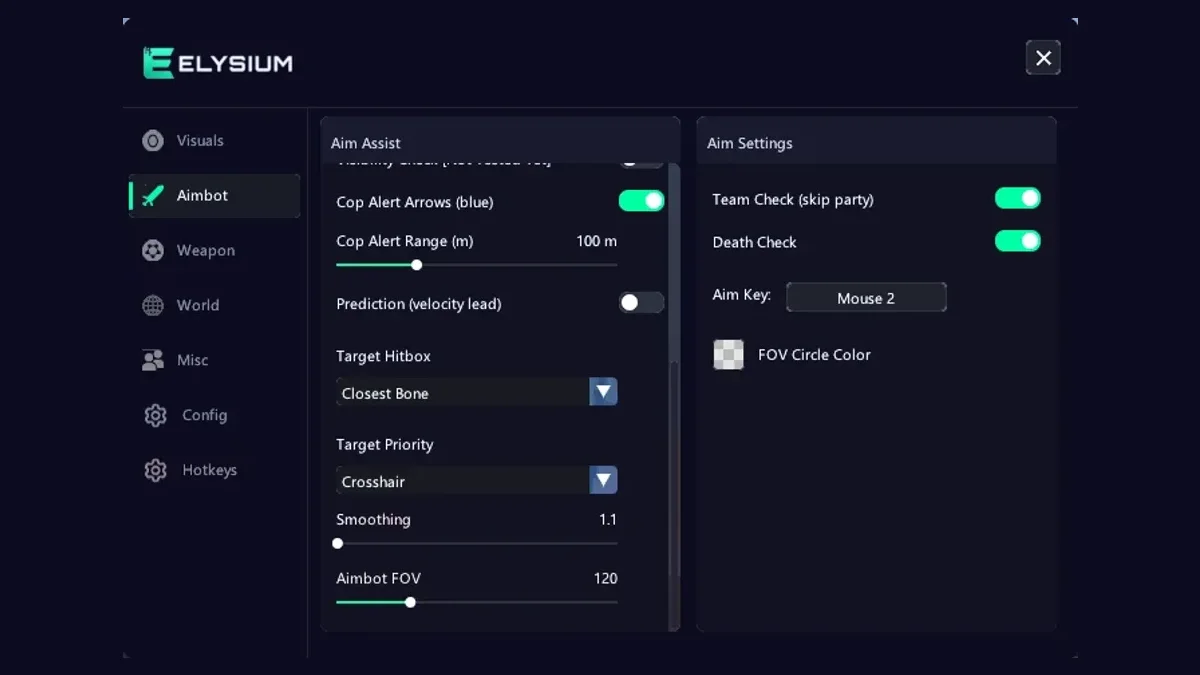
An aimbot is the part of Rob Run cheats that other players notice first. ESP happens on your screen. Aim happens in front of everyone. A badly tuned Rob Run aimbot can turn a quiet session into a pile of reports, while a well tuned one just looks like you are having a good day. Good Rob Run cheats give you control over every part of the aim. This guide goes through each setting in the Elysium RR aimbot tab and explains how it changes what others see.
Rob Run aimbot basics: enable, key and FOV circle
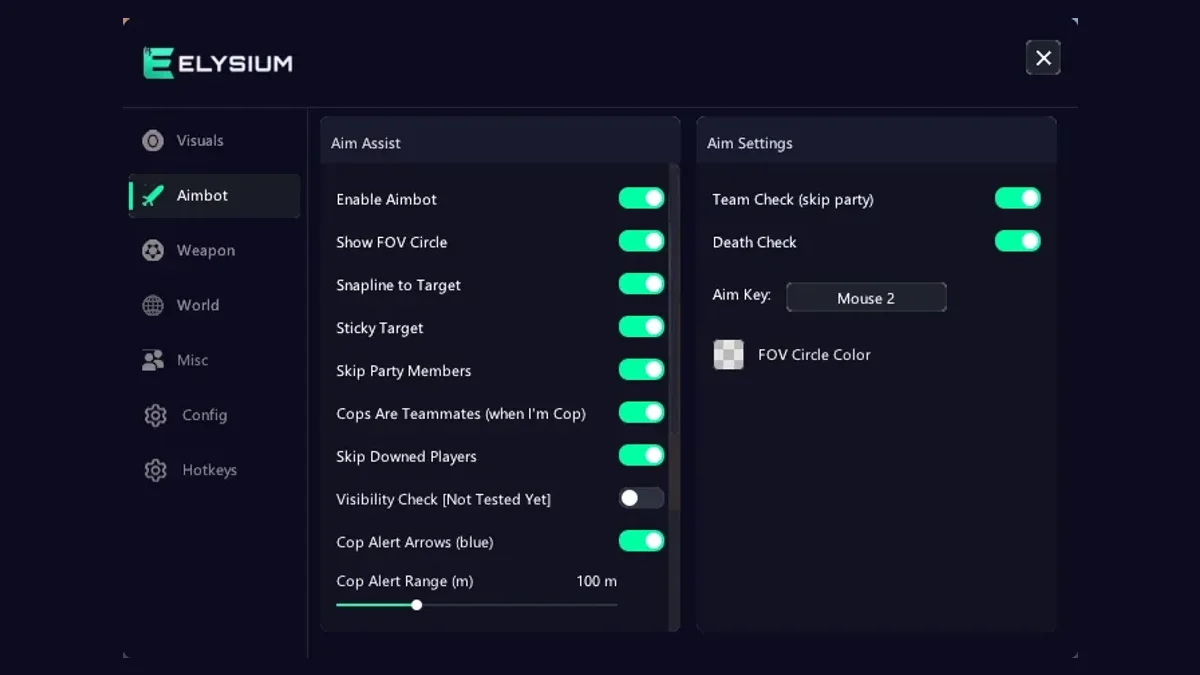
Enable Aimbot turns the feature on. Aim Key sets the button you hold to make it work. Always use a key. An aimbot that is active the whole time will lock on in moments where a real player would never react, such as someone running past a window behind you.
The FOV circle draws the area on your screen where the aimbot looks for targets. Turn it on while you tune, so you can see how big your aim zone really is. You can turn it off later if you prefer a clean screen.
Aimbot FOV: the most important number
Aimbot FOV sets how far from your crosshair the aimbot will reach for a target. This is the setting that decides whether you look legit or not.
- Small FOV: the aimbot only helps when you are already aiming close to someone. It feels like slightly better aim. This is what you want.
- Large FOV: the aimbot grabs targets far from your crosshair and swings your view to them. On a spectator screen this looks like your camera is being dragged.
Start small with any Rob Run aimbot. If you find it rarely kicks in, raise it a little at a time. Most legit setups keep the circle not much wider than the area around a player's body at normal fight range.
Smoothing: how fast the aim moves
Smoothing controls how quickly your aim travels to the target. Low smoothing means an instant snap. Higher smoothing means a gradual pull that looks like a human moving a mouse.
A snap is the single most reported behaviour in any shooter. Even a few frames of smoothing make a big difference. Pair a small FOV with medium smoothing and the aimbot becomes very hard to tell apart from good tracking.
Prediction and lead strength
Prediction is where a Rob Run aimbot earns its keep, because Rob Run has plenty of moving targets: players sprinting between cover, robbers running cargo, people jumping in and out of cars. Prediction adds a velocity lead, so the aim point sits slightly ahead of a moving player instead of on where they were a moment ago.
Lead/Prediction Strength sets how far ahead it aims. Too low and you trail behind runners. Too high and you aim into empty space. Test it on players crossing in front of you at medium distance and adjust until your shots land on the body, not just behind it.
Target bone
Target Bone decides where on the body the aimbot aims. Head is the obvious choice for damage, but a stream of headshots from every distance looks unnatural. Chest or upper body gives steady hits and a much more believable stat line. Many players use the chest for general fights and only switch to the head with a hotkey when they really need it.
Target priority and sticky target
Target Priority sets how the aimbot picks between several players inside your FOV. Common choices are the closest to your crosshair or the closest in distance. Closest to crosshair tends to look more natural, because it follows where you are already looking.
Sticky Target keeps the aimbot on the same player until they leave your FOV or go down. Without it, the aim may jump between two people standing close together. Sticky target makes your aim look steadier and more deliberate.
Filters that keep you out of trouble
These options stop the aimbot from doing things that would give you away or waste shots:
- Skip Same Role: leaves anyone with your role alone, which stops a cop from locking on to a fellow cop
- Skip Party Members: ignores your teammates
- Skip Downed Players: passes over anyone lying in the KO state
- Team Check and Death Check: extra filters for friendly and dead players
- Max Aim Distance: limits how far away a target can be
Max aim distance is worth setting carefully. Landing shot after shot at extreme range is a giveaway. Keep it to the range where a skilled player could reasonably hit.
Snapline to target draws a line to whoever the aimbot has picked. It is handy while you tune, so you can see which player it chose. Turn it off once you trust your settings.
Legit setup vs obvious setup
Here is a quick comparison.
A legit Rob Run aimbot setup
- Aim key held, not always on
- Small aimbot FOV
- Medium smoothing
- Prediction on, moderate strength
- Chest as target bone
- Closest to crosshair priority
- Sticky target on
- Skip party, skip downed, team and death checks on
- Max aim distance at normal fight range
An obvious Rob Run hack setup
- Always on, huge FOV
- No smoothing
- Head bone at any range
- No distance limit
The second one wins a few more fights for a short time, then gets clipped and reported. The first one keeps you winning without making a scene.
Weapon tab settings that pair with aim
The weapon tab has options that interact with aim. RCS jitter and its speed help control recoil. RCS pull down is marked as not tested and can be risky, so leave it off for now. Full automatic is also marked risky. Rapid fire sits on Mouse 4, so you only use it when you choose to. Keep these modest and the Rob Run aimbot does not need to work as hard. For why this matters right now, read our piece on the recent anti-cheat update and HWID bans.
Save two profiles
Use the config section to save a calm everyday profile and a slightly stronger one for tense fights. Bind them to feature hotkeys for quick switching mid-round. New to the menu? The install guide gets you running first. Elysium RR is sold on the PlayWithCheats product page.
Tuning in practice
Play two or three rounds with the legit setup above. Watch for moments where the aim feels too sudden, and add smoothing. Watch for moments where it never helps, and widen the FOV a little. Change one setting at a time, so you know which change made the difference. Once you are happy, pair it with a clean ESP layout and you will rarely need the aimbot to do the heavy lifting.
Get Elysium RR for Rob Run
External, StreamProof, currently undetected. 7 Days $14.99 · 30 Days $29.99 · Lifetime $139.99
More Rob Run guides
Rob Run Anti-Cheat Update and HWID Bans: Who Gets Hit
If you use Rob Run cheats, you have probably seen the chatter this week: players saying they got hit with hardware bans after the latest anti-cheat changes. Some lost one account. Some say every account on the same PC...
Read article →
Rob Run ESP Guide: A Player ESP Setup You Can Read
Player ESP is the feature most people turn on first when they try Rob Run cheats, and it is also the one most people set up badly. Switch on every option and your screen turns into a wall of boxes, lines, and text that...
Read article →
Rob Run Loot and Cash ESP: Safes, Crypto Farms and Routes
Most of the money in Rob Run is not made in gunfights. It is made by knowing where the value is, getting there first, and getting it to a buyer without losing it. That is where the loot side of Rob Run cheats pays off....
Read article →